

Python Review#
Why Python#
General purpose programming language (script, OOP, interactive)
Interpreted (no need of binary, runs until failure)
Powerful environment for scientific computing
Free - https://www.python.org/downloads/
Simple
Massive community support

Agenda#
Basic Python
Basic data types (Containers, Lists, Dictionaries, Sets, Tuples)
Functions
Classes
Running modes#
Interactivly
Starting the Interpreter
Executing Python Code (Enter)
Exiting the Interpreter(exit())
Running a Python Script from the Command Line
Interacting with Python through an IDE
Python Versions#
We’ll be using Python 3 for this iteration of the course. You can check your Python version at the command line by running python --version.
!python3 --version
Python 3.9.21
Basics of Python#
Python is a high-level, dynamically typed multiparadigm programming language.
Python code is often said to be almost like pseudocode, since it allows you to express very powerful ideas in very few lines of code while being very readable.
Whitespaces are important. Python uses indentation, no braces are needed.
As an example, here is an implementation of the classic quicksort algorithm in Python:
def quicksort(arr):
    if len(arr) <= 1:
        return arr
    pivot = arr[len(arr) // 2]
    left = [x for x in arr if x < pivot]
    middle = [x for x in arr if x == pivot]
    right = [x for x in arr if x > pivot]
    return quicksort(left) + middle + quicksort(right)

print(quicksort([3,6,8,10,1,2,1]))
[1, 1, 2, 3, 6, 8, 10]
Basic data types#
The followings are Built-In data types, next lectures we will see external data structers such Numpy and Pandas.
Numbers#
Every thing is an object in Python
Integers and floats work as you would expect from other languages:
#32-bit
x = 20
print(x, type(x))
20 <class 'int'>
x.to_bytes(4,'big')
b'\x00\x00\x00\x14'
x.bit_length()
5
Explicit int creation
x_explicit = int(3) #not common
print(x + 1)   # Addition
print(x - 1)   # Subtraction
print(x * 2)   # Multiplication
print(x ** 2)  # Exponentiation
21
19
40
400
int object methods
dir(x)
['__abs__',
 '__add__',
 '__and__',
 '__bool__',
 '__ceil__',
 '__class__',
 '__delattr__',
 '__dir__',
 '__divmod__',
 '__doc__',
 '__eq__',
 '__float__',
 '__floor__',
 '__floordiv__',
 '__format__',
 '__ge__',
 '__getattribute__',
 '__getnewargs__',
 '__gt__',
 '__hash__',
 '__index__',
 '__init__',
 '__init_subclass__',
 '__int__',
 '__invert__',
 '__le__',
 '__lshift__',
 '__lt__',
 '__mod__',
 '__mul__',
 '__ne__',
 '__neg__',
 '__new__',
 '__or__',
 '__pos__',
 '__pow__',
 '__radd__',
 '__rand__',
 '__rdivmod__',
 '__reduce__',
 '__reduce_ex__',
 '__repr__',
 '__rfloordiv__',
 '__rlshift__',
 '__rmod__',
 '__rmul__',
 '__ror__',
 '__round__',
 '__rpow__',
 '__rrshift__',
 '__rshift__',
 '__rsub__',
 '__rtruediv__',
 '__rxor__',
 '__setattr__',
 '__sizeof__',
 '__str__',
 '__sub__',
 '__subclasshook__',
 '__truediv__',
 '__trunc__',
 '__xor__',
 'as_integer_ratio',
 'bit_length',
 'conjugate',
 'denominator',
 'from_bytes',
 'imag',
 'numerator',
 'real',
 'to_bytes']
x += 1
print(x)
x *= 2
print(x)
21
42
# 64-bit
y = 2.5
print(type(y))
print(y, y + 1, y * 2, y ** 2)
<class 'float'>
2.5 3.5 5.0 6.25
Python also has built-in types for long integers and complex numbers; you can find all of the details in the documentation.
Booleans#
Python implements all of the usual operators for Boolean logic, but uses English words rather than symbols (&&, ||, etc.):
t, f = True, False
print(type(t))
<class 'bool'>
Now we let’s look at the operations:
print(t and f) # Logical AND;
print(t or f)  # Logical OR;
print(not t)   # Logical NOT;
print(t != f)  # Logical XOR;
False
True
False
True
Strings#
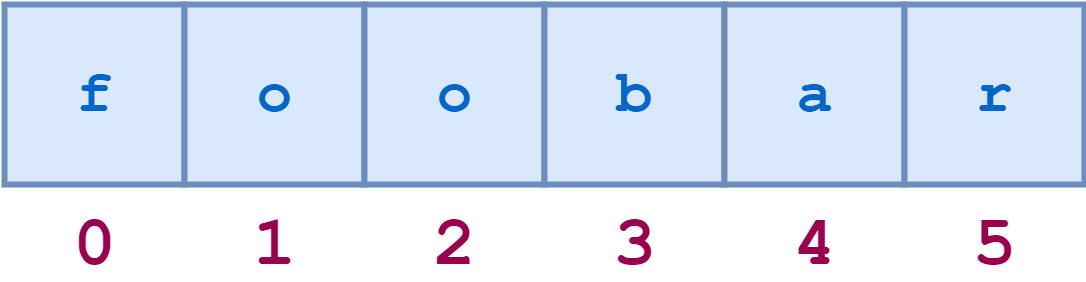
s = 'foobar'
s[3]
'b'
hello = 'good'   # String literals can use single quotes
world = "morning"   # or double quotes; it does not matter
print(hello, len(hello))
good 4
hw = hello + ' ' + world  # String concatenation
print(hw)
good morning
hw12 = '{}-{}-{}'.format(hello, world, 12)  # string formatting
print(hw12)
good-morning-12
hw22 = f'{hello}-{world}-{22}' # latest way is f-strings
print(hw22)
good-morning-22
String objects have a bunch of useful methods; for example:
s = "hello"
print(s.capitalize())  # Capitalize a string
print(s.upper())       # Convert a string to uppercase; prints "HELLO"
print(s.rjust(7))      # Right-justify a string, padding with spaces
print(s.center(7))     # Center a string, padding with spaces
print(s.replace('l', '(ell)'))  # Replace all instances of one substring with another
print('  world '.strip())  # Strip leading and trailing whitespace, useful in text processing
Hello
HELLO
  hello
 hello
he(ell)(ell)o
world
You can find a list of all string methods in the documentation.
Other bases#
print(0o10) # Octal
print(0x10) # Hexa
print(0b101) # Binary
8
16
5
Magic Methods#
Magic methods in Python are the special methods that start and end with the double underscores. They are also called dunder methods. Magic methods are not meant to be invoked directly by you, but the invocation happens internally from the class on a certain action.
dir(x)
['__abs__',
 '__add__',
 '__and__',
 '__bool__',
 '__ceil__',
 '__class__',
 '__delattr__',
 '__dir__',
 '__divmod__',
 '__doc__',
 '__eq__',
 '__float__',
 '__floor__',
 '__floordiv__',
 '__format__',
 '__ge__',
 '__getattribute__',
 '__getnewargs__',
 '__gt__',
 '__hash__',
 '__index__',
 '__init__',
 '__init_subclass__',
 '__int__',
 '__invert__',
 '__le__',
 '__lshift__',
 '__lt__',
 '__mod__',
 '__mul__',
 '__ne__',
 '__neg__',
 '__new__',
 '__or__',
 '__pos__',
 '__pow__',
 '__radd__',
 '__rand__',
 '__rdivmod__',
 '__reduce__',
 '__reduce_ex__',
 '__repr__',
 '__rfloordiv__',
 '__rlshift__',
 '__rmod__',
 '__rmul__',
 '__ror__',
 '__round__',
 '__rpow__',
 '__rrshift__',
 '__rshift__',
 '__rsub__',
 '__rtruediv__',
 '__rxor__',
 '__setattr__',
 '__sizeof__',
 '__str__',
 '__sub__',
 '__subclasshook__',
 '__truediv__',
 '__trunc__',
 '__xor__',
 'as_integer_ratio',
 'bit_length',
 'conjugate',
 'denominator',
 'from_bytes',
 'imag',
 'numerator',
 'real',
 'to_bytes']
x.__pow__(2)
1764
x **2
1764
Containers#
Python includes several built-in container types: lists, dictionaries, sets, and tuples.
The Collection in Java is a framework that provides an architecture to store and manipulate the group of objects.
Lists#
A list is the Python equivalent of an array, but is resizeable and can contain elements of different types:
xs = [3, 1, 2]   # Create a list
print(xs, xs[2])
[3, 1, 2] 2
is mutatble ?
xs[2] = 'foo'    # Lists can contain elements of different types
print(xs)
[3, 1, 'foo']
xs.append('bar') # Add a new element to the end of the list
print(xs)
[3, 1, 'foo', 'bar']
x = xs.pop()     # Remove and return the last element of the list
print(x, xs)
bar [3, 1, 'foo']
Lists can be nested.

x = ['a', ['bb', ['ccc', 'ddd'], 'ee', 'ff'], 'g', ['hh', 'ii'], 'j'] # different object types in same list
x
['a', ['bb', ['ccc', 'ddd'], 'ee', 'ff'], 'g', ['hh', 'ii'], 'j']
neagitive index
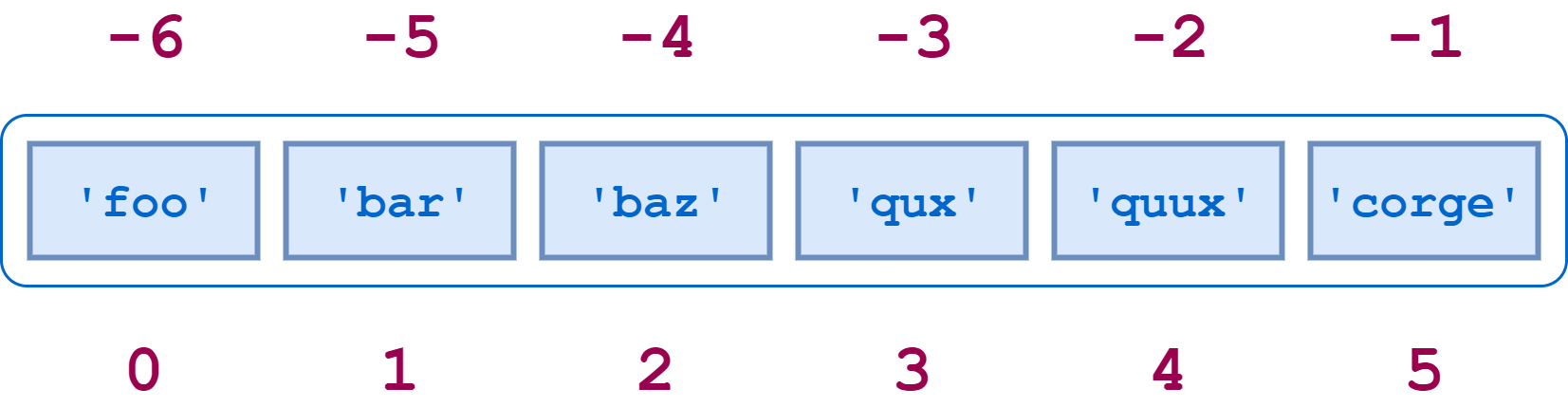
a = ['foo', 'bar', 'baz', 'qux', 'quux', 'corge']
a[-2]
'quux'
As usual, you can find all the details about lists in the documentation.
Slicing#
In addition to accessing list elements one at a time, Python provides concise syntax to access sublists; this is known as slicing:
nums = list(range(5))    # range is a built-in function that creates a list of integers
print(nums)         # Prints "[0, 1, 2, 3, 4]"
print(nums[2:4])    # Get a slice from index 2 to 4 (exclusive); prints "[2, 3]"
print(nums[2:])     # Get a slice from index 2 to the end; prints "[2, 3, 4]"
print(nums[:2])     # Get a slice from the start to index 2 (exclusive); prints "[0, 1]"
print(nums[:])      # Get a slice of the whole list; prints ["0, 1, 2, 3, 4]"
print(nums[:-1])    # Slice indices can be negative; prints ["0, 1, 2, 3]"
nums[2:4] = [8, 9] # Assign a new sublist to a slice
print(nums)         # Prints "[0, 1, 8, 9, 4]"
[0, 1, 2, 3, 4]
[2, 3]
[2, 3, 4]
[0, 1]
[0, 1, 2, 3, 4]
[0, 1, 2, 3]
[0, 1, 8, 9, 4]
ynwa = ["you", "will", "never", "walk", "alone"]
ynwa.index("walk") # finding element
3
Loops#
You can loop over the elements of a list like this:
animals = ['cat', 'dog', 'monkey']
for animal in animals:
    print(animal)
cat
dog
monkey
If you want access to the index of each element within the body of a loop, use the built-in enumerate function:
animals = ['cat', 'dog', 'monkey']
for idx, animal in enumerate(animals):
    print(f'#{idx+1}: {animal}')
#1: cat
#2: dog
#3: monkey
List comprehensions#
When programming, frequently we want to transform one type of data into another. As a simple example, consider the following code that computes square numbers:
nums = [0, 1, 2, 3, 4]
squares = []
for x in nums:
    squares.append(x ** 2)
print(squares)
[0, 1, 4, 9, 16]
You can make this code simpler using a list comprehension:
nums = [0, 1, 2, 3, 4]
squares = [x ** 2 for x in nums]
print(squares)
[0, 1, 4, 9, 16]
List comprehensions can also contain conditions, filter and transform the values in one line:
nums = [0, 1, 2, 3, 4]
even_squares = [x ** 2 for x in nums if x % 2 == 0]
print(even_squares)
[0, 4, 16]
Dictionaries#
A dictionary stores (key, value) pairs, similar to a Map in Java or an object in Javascript. You can use it like this:
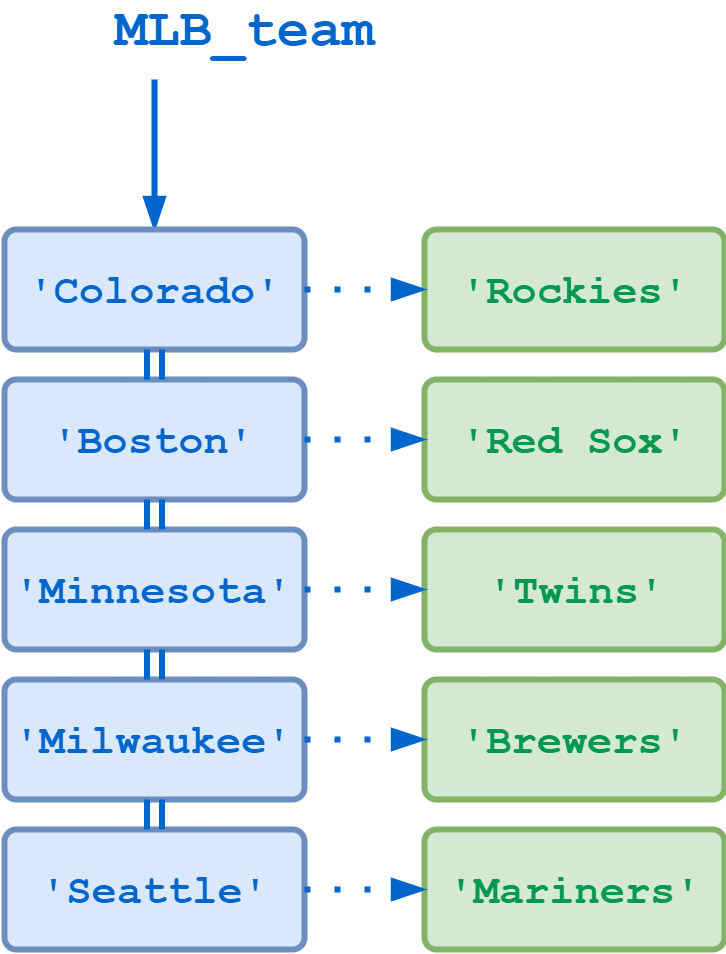
# Create a new dictionary with some data
MLB_team = {
     'Colorado' : 'Rockies',
     'Boston'   : 'Red Sox',
     'Minnesota': 'Twins',
     'Milwaukee': 'Brewers',
     'Seattle'  : 'Mariners'
 }
print(MLB_team['Boston'])       # Get an entry from a dictionary
print('Seattle' in MLB_team)     # Check if a dictionary has a given key
Red Sox
True
is at mutable ?
MLB_team['New York'] = 'Mets'    # Set an entry in a dictionary
print(MLB_team['New York'] )
Mets
print(MLB_team['Los Angeles']) # KeyError
---------------------------------------------------------------------------
KeyError                                  Traceback (most recent call last)
Cell In[39], line 1
----> 1 print(MLB_team['Los Angeles'])  # KeyError

KeyError: 'Los Angeles'
better solution
print(MLB_team.get('Atlanta', 'N/A'))  # Get an element with a default
print(MLB_team.get('Seattle', 'N/A'))  # Get an element with a default
del MLB_team['Seattle']        # Remove an element from a dictionary
print(MLB_team.get('Seattle', 'N/A')) # "fish" is no longer a key
You can find all you need to know about dictionaries in the documentation.
It is easy to iterate over the keys in a dictionary:
d = {'person': 2, 'cat': 4, 'spider': 8}
for k, v in d.items():
    print(f'A {k} has {v} legs')
Dictionary comprehensions: These are similar to list comprehensions, but allow you to easily construct dictionaries. For example:
nums = [0, 1, 2, 3, 4]
even_num_to_square = {x: x ** 2 for x in nums if x % 2 == 0}
print(even_num_to_square)
Nested Dictionary
# keys are IDs
students = {
              1: {'name': 'John', 'age': '27', 'sex': 'Male',
                  'address': {'country':'England', 'city':'London'}},
              2: {'name': 'Marie', 'age': '22', 'sex': 'Female',
                  'address': {'country':'France','city':'Lyon'}}
            }
students[2]['address']['city']
Sets#
Python’s built-in set type has the following characteristics:
Sets are unordered
Set elements are unique. Duplicate elements are not allowed.
A set itself may be modified, but the elements contained in the set must be of an immutable type.
A set is an unordered collection of distinct elements. As a simple example, consider the following:
x = set(['foo', 'bar', 'baz', 'foo', 'qux', 2, 2, 7])
print(x)
animals = {'cat', 'dog'}
print('cat' in animals)   # Check if an element is in a set
print('fish' in animals)  # prints ?
animals[0]
animals.add('fish')      # Add an element to a set
print('fish' in animals)
print(len(animals))       # Number of elements in a set;
animals.add('cat')       # Adding an element that is already in the set does nothing
print(len(animals))
animals.remove('cat')    # Remove an element from a set
print(len(animals))
Loops: Iterating over a set has the same syntax as iterating over a list; however since sets are unordered, you cannot make assumptions about the order in which you visit the elements of the set:
animals = {'cat', 'dog', 'fish'}
for idx, animal in enumerate(animals):
    print('#{}: {}'.format(idx + 1, animal))
Set comprehensions: Like lists and dictionaries, we can easily construct sets using set comprehensions:
from math import sqrt
print({int(sqrt(x)) for x in range(30)})
What will be printed ? Why ?
from math import sqrt
print([int(sqrt(x)) for x in range(30)])
Mathimatical view.
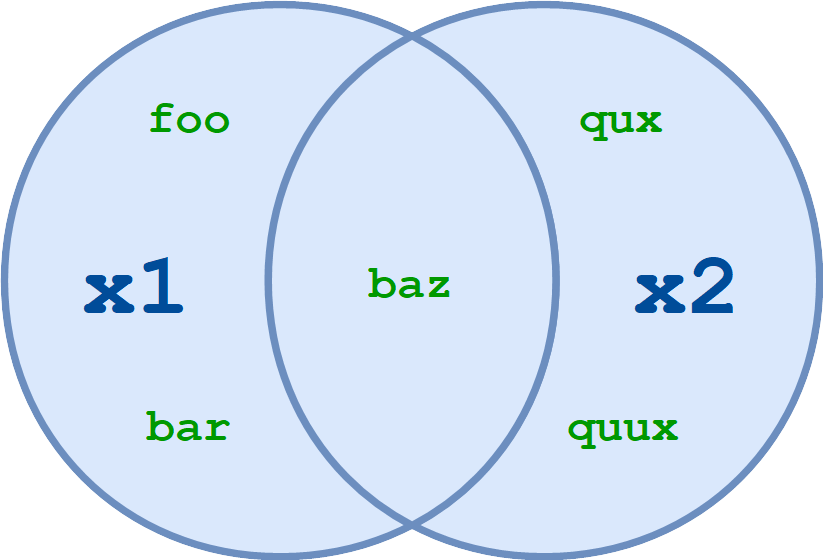
x1 = {'foo', 'bar', 'baz'}
x2 = {'baz', 'qux', 'quux'}
x1.union(x2)
Tuples#
A tuple is an (immutable) ordered list of values.
tup1 = ('a', 'b', 22, 33)
tup1[2]
try to change it
tup1[2] = 3
A tuple is in many ways similar to a list; one of the most important differences is that tuples can be used as keys in dictionaries and as elements of sets, while lists cannot. Here is a trivial example:
d = {(x, x + 1): x for x in range(10)}  # Create a dictionary with tuple keys
t = (5, 6)      # Create a tuple
print(d)
print(type(t))
print(d[t])
print(d[(1, 2)])
Conditional#
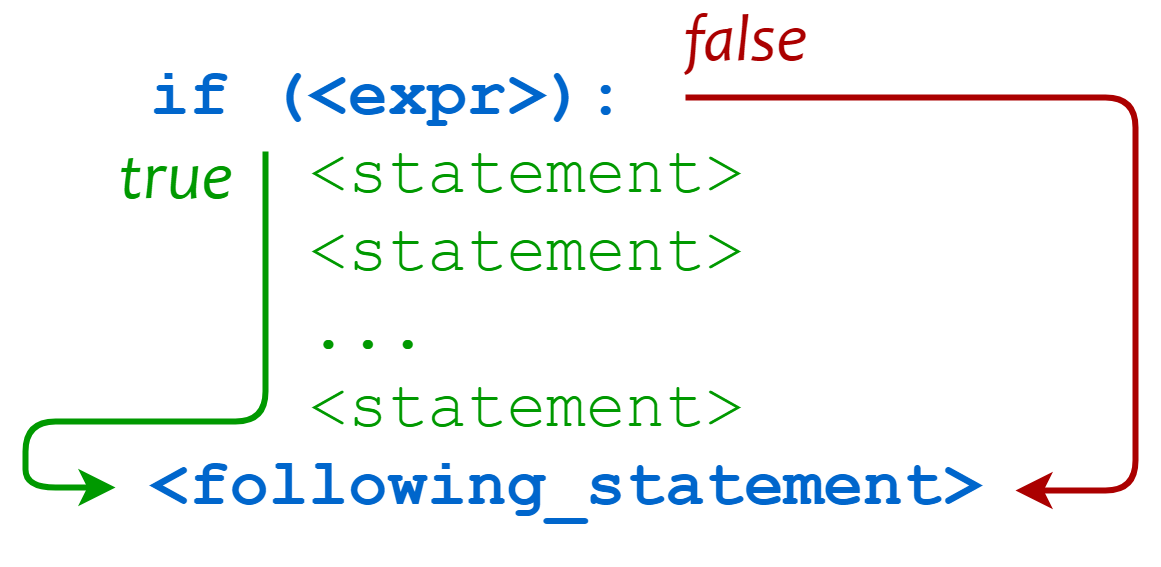
if 'foo' in ['bar', 'baz', 'qux', 'foo']:
    print('Expression was true')
    print('Executing statement in suite')
    print('...')
    print('Done.')
print('After conditional')
The elif Statement#
var = 100
if var == 200:
   print("1 - Got a true expression value")
   print(var)
elif var == 150:
   print("2 - Got a true expression value")
   print(var)
elif var == 100:
   print("3 - Got a true expression value")
   print(var)
else:
   print("4 - Got a false expression value")
   print(var)

print("Good bye!")
Python Exceptions#
A Python program terminates as soon as it encounters an error. In Python, an error can be a syntax error or an exception.
Syntax errors occur when the parser detects an incorrect statement. Observe the following example:
print('hello'))
We can use raise to throw an exception if a condition occurs. The statement can be complemented with a custom exception.
x = 10
if x > 5:
    raise Exception(f'x should not exceed 5. The value of x was: {x}')
Some functions raises exception, in order to handle these exceptions and avoid terminating the program, we can use try/except. demonstrated at class.
Functions#
As every language it comes with Built-In functions, we have encoutered (print(), pow()… )
Python functions are defined using the def keyword. For example:
def sign(x):
    if x > 0:
        return 'positive'
    elif x < 0:
        return 'negative'
    else:
        return 'zero'

for x in [-1, 0, 1]:
    print(sign(x))
sign
New PEP 484 function annotations: read more
def sign(x: float) -> str:
    if x > 0:
        return 'positive'
    elif x < 0:
        return 'negative'
    else:
        return 'zero'

for x in [-1, 0, 1]:
    print(sign(x))
sign
We will often define functions to take optional keyword arguments, like this:
def hello(name, loud=False, age):
    if loud:
        print('HELLO, {}'.format(name.upper()))
    else:
        print('Hello, {}!'.format(name))

hello('Bob',age=20)
hello('Fred', loud=True)
Some Concepts#
Indentation#
This is how the code is structured.
Noramally, the standard is four spaces (from the guidelines):
“Python 3 disallows mixing the use of tabs and spaces for indentation.”
a = 0
b = 5
if a < b:
    print("Indentation")
# IndentationError
if a < b:
print("Indentation")
Object References#
Every variable is a reference to an object
Upon assignment (=) you are creating a reference for the right-hand side.
Object references doesn’t have a single type associated with them.
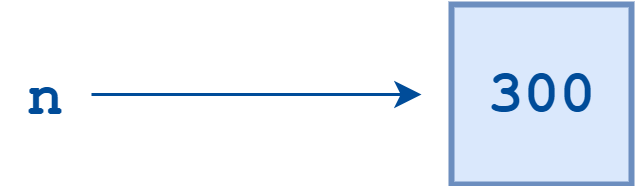
n = 300
m = n

print(id(n))
print(id(m))
m = 400
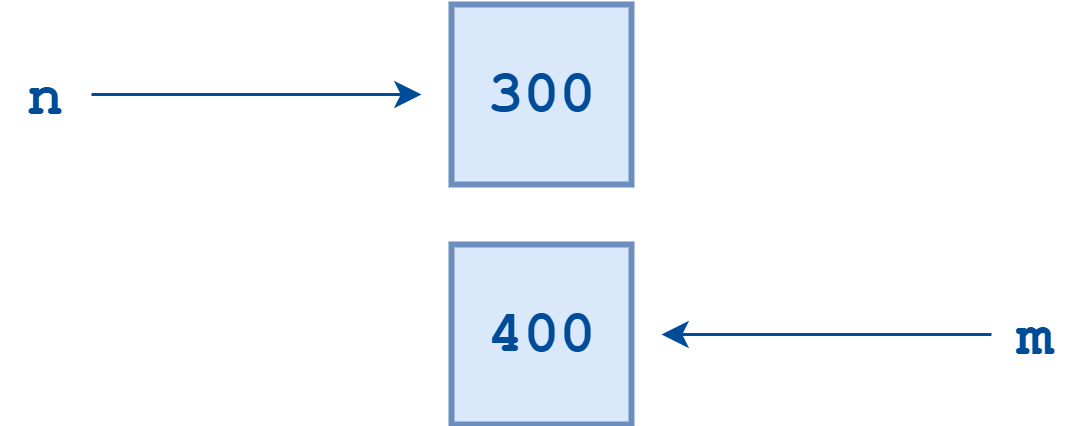
In Python, every object that is created is given a number that uniquely identifies it. It is guaranteed that no two objects will have the same identifier during any period in which their lifetimes overlap. Once an object’s reference count drops to zero and it is garbage collected,
print(id(n))
print(id(m))
m = 'Im string'
print(m)
spam = [1,2,3]
eggs = spam
eggs.append(99)
spam
# also function get args by ref
def popit(lst):
    if lst:  # Check if empty
        lst.pop(-1)
popit(spam)
eggs
How to assign by value ?
list1 = ['dont', 'change', 'me']
list2 = list1.copy()
list2.append('why?')
print(list2)
print(list1)
Variable Names#
Officially, variable names in Python can be any length and can consist of uppercase and lowercase letters (A-Z, a-z), digits (0-9), and the underscore character (_). An additional restriction is that, although a variable name can contain digits, the first character of a variable name cannot be a digit.
Reserved Words#
There is one more restriction on identifier names. The Python language reserves a small set of keywords that designate special language functionality. No object can have the same name as a reserved word.
help("keywords")
Importing modules#
Calling a .py file from where it can be accessed using the “import” keyword makse it a module
%%writefile my_module.py

print('Imported my_module...')

test = 'Test String'


def find_index(to_search, target):
    '''Find the index of a value in a sequence'''
    for i, value in enumerate(to_search):
        if value == target:
            return i

    return -1
print(__name__)
if __name__ == "__main__":
    print(2+3)
import my_module as my
courses = ['History', 'Math', 'Physics', 'CompSci']
my.find_index(courses, 'Math')
Classes#
The syntax for defining classes in Python is straightforward:
class Employee:

    raise_amt = 1.04

    def __init__(self, first, last, pay):
        self.first = first
        self.last = last
        self.email = first + '.' + last + '@email.com'
        self.pay = pay

    def fullname(self):
        return f'{self.first} {self.last}'

    def apply_raise(self):
        self.pay = int(self.pay * self.raise_amt)


emp_1 = Employee('Lady', 'Gaga', 50000)
emp_2 = Employee('Test', 'Employee', 60000)

print(emp_2.fullname())
print(emp_2.pay)
print(Employee.raise_amt)
Employee.raise_amt = 2
# intsance method
emp_2.apply_raise()
print(emp_2.pay)
Inheritance#
class Developer(Employee):
    raise_amt = 1.10

    def __init__(self, first, last, pay, prog_lang):
        super().__init__(first, last, pay)
        self.prog_lang = prog_lang


class Manager(Employee):

    def __init__(self, first, last, pay, employees=None):
        super().__init__(first, last, pay)
        if employees is None:
            self.employees = []
        else:
            self.employees = employees

    def add_emp(self, emp):
        if emp not in self.employees:
            self.employees.append(emp)

    def remove_emp(self, emp):
        if emp in self.employees:
            self.employees.remove(emp)

    def print_emps(self):
        for emp in self.employees:
            print('-->', emp.fullname())


dev_1 = Developer('Corey', 'Schafer', 50000, 'Python')
dev_2 = Developer('Test', 'Employee', 60000, 'Java')

mgr_1 = Manager('Sue', 'Smith', 90000, [dev_1])

print(mgr_1.email)

mgr_1.add_emp(dev_2)
mgr_1.remove_emp(dev_2)

mgr_1.print_emps()