

C Python API#
External Packages#
Python comes with built-in packages, that provide wide functionality, for example: OS, math, sys …etc
We can extend our Python with external packages (avoid re-inventing the wheel), we can download and install from the below using pip command:
https://pypi.org/
Github
more…
Example if want the Numpy package:
pip3 install numpy
And then from python code we can use it :
import numpy as np
Virtual Environment#
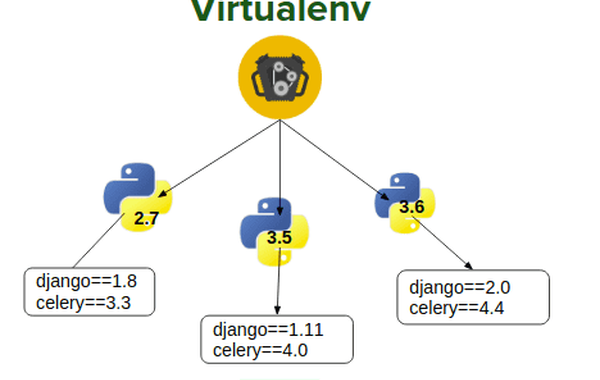
There many framworks to manage virtualenv:
conda works on Nova
and more…
Building a Python C Extension Module#
There are several ways in which you can extend the functionality of Python (import external packages as shown earlier). And to write your Python module in C or C++. This process can lead to improved performance and better access to C library functions and system calls. In this lesson, you’ll discover how to use the Python API to write Python C extension modules.
Agenda#
Invoke C functions from within Python
Pass arguments from Python to C and parse them accordingly
Raise exceptions from C code and create custom Python exceptions in C
Define global constants in C and make them accessible in Python
Extending Python#
One of the lesser-known yet incredibly powerful features of Python is its ability to call functions and libraries defined in compiled languages such as C or C++. This allows you to extend the capabilities of your program beyond what Python’s built-in features have to offer.
To write Python modules in C, you’ll need to use the Python API, which defines the various functions, macros, and variables that allow the Python interpreter to call your C code. All of these tools and more are collectively bundled in the Python.h header file.
Example 1#
Program which implements the Sum of geometric series: $\(\sum_{k=0}^{∞} r^k\)$
geo.c
#include <stdio.h>
#include <math.h>

double geo_c(double z, int n)
{
    double geo_sum = 0;
    int i;
    for (i=0; i<n; i++){
        /* pow(x,y) function raises x to the power of y - it is from <math.h> */
        geo_sum += pow(z,i);
     }
    return geo_sum;
}

int main() {
   printf("%f",geo_c(0.5,100));
   return 0;
}
gcc geo.c -o geo -lm
How to call it from Python ?#
1.Creating C module#
geomodule.c
#define PY_SSIZE_T_CLEAN
#include <Python.h>
First thing is to import the Python header, you will get warning in ide (don’t worry) it will work !
A good practice is to name the file name with (something)module.c to distinguish it from regular C files (you don’t have to but it’s recommended).
2.Wrapping the function#
We would like to interface the geo_c function so one can call it from Python.
static PyObject* geo_sum(PyObject *self, PyObject *args)
{
    double z;
    int n;
    /* This parses the Python arguments into a double (d)  variable named z and int (i) variable named n*/
    if(!PyArg_ParseTuple(args, "di", &z, &n)) {
        return NULL; /* In the CPython API, a NULL value is never valid for a
                        PyObject* so it is used to signal that an error has occurred. */
    }

/* This builds the answer ("d" = Convert a C double to a Python floating point number) back into a python object */
    return Py_BuildValue("d", geo_c(z, n)); /*  Py_BuildValue(...) returns a PyObject*  */
}
The above code includes new objects provided by the Python.h:
PyObject
PyArg_ParseTuple()
Py_BuildValue()
PyObject
Every value you can touch in Python is a PyObject in C. That includes lists, dictionaries, sockets, files, integers, strings, functions, classes, you name it.
A PyObject can represent any Python object. It is a fairly minimal C struct consisting of a reference count and a pointer to the object proper:
typedef struct _object {
    Py_ssize_t ob_refcnt;
    struct _typeobject *ob_type;
} PyObject;
PyArg_ParseTuple()
PyArg_ParseTuple() parses the arguments you’ll receive from your Python program into local variables.
If you look at line 6, then you’ll see that PyArg_ParseTuple() takes the following arguments:
args are of type PyObject.
“di” is the format specifier that specifies the data type of the arguments to parse.
&z and &n are pointers to local variables to which the parsed values will be assigned.
PyArg_ParseTuple() evaluates to false on failure. If it fails, then the function will return NULL and not proceed any further.
Main format units (full list here):

The api supports more formating strategies, for example see.
Py_BuildValue()
Convert a C double to a Python floating point number) back into a python object. For complete list of values see documentation.
Alternativly, we can use a specific method PyFloat_FromDouble
3.PyMethodDef#
In order to call the methods defined in your module, you’ll need to tell the Python interpreter about them first. To do this, you can use PyMethodDef. This is a structure with 4 members representing a single method in your module.
Ideally, there will be more than one method in your Python C extension module that you want to be callable from the Python interpreter. This is why you need to define an array of PyMethodDef structs:
static PyMethodDef geoMethods[] = {
    {"geo_sum",                   /* the Python method name that will be used */
      (PyCFunction) geo_sum, /* the C-function that implements the Python function and returns static PyObject*  */
      METH_VARARGS,           /* flags indicating parameters
accepted for this function */
      PyDoc_STR("A geometric series up to n. sum_up_to_n(z^n)")}, /*  The docstring for the function */
    {NULL, NULL, 0, NULL}     /* The last entry must be all NULL as shown to act as a
                                 sentinel. Python looks for this entry to know that all
                                 of the functions for the module have been defined. */
};
Each individual member of the struct holds the following info:
“geo_sum” is the name the user would write to invoke this particular function in Python.
geo_sum, is the name of the C function to invoke.
METH_VARARGS is a flag that tells the interpreter that the function will accept two arguments of type PyObject*:
self is the module object.
args is a tuple containing the actual arguments to your function, these arguments are unpacked using PyArg_ParseTuple().
The final string is a value to represent the method docstring.
4.PyModuleDef#
This initiates the module using the above definitions.
static struct PyModuleDef geomodule = {
    PyModuleDef_HEAD_INIT,
    "geo_capi", /* name of module */
    NULL, /* module documentation, may be NULL */
    -1,  /* size of per-interpreter state of the module, or -1 if the module keeps state in global variables. */
    geoMethods /* the PyMethodDef array from before containing the methods of the extension */
};
More info on PyModuleDef
5.PyMODINIT_FUNC#
When a Python program imports your module for the first time, it will call PyInit_geo_capi():
PyMODINIT_FUNC PyInit_geo_capi(void)
{
    PyObject *m;
    m = PyModule_Create(&geomodule);
    if (!m) {
        return NULL;
    }
    return m;
}
The PyModuleDef structure, in turn, must be passed to the interpreter in the module’s initialization function.
The initialization function must be named PyInit_name(), where name is the name of the module and should match, what we wrote in struct PyModuleDef.
This should be the only non-static item defined in the module file.

6.Building the new module#
You’ll need a file called setup.py to install your application.
from setuptools import Extension, setup

module = Extension("geo_capi", sources=['geomodule.c'])
setup(name='geo_capi',
     version='1.0',
     description='Python wrapper for custom C extension',
     ext_modules=[module])
7.Installing your module#
Now that you have your setup.py file, you can use it to build your Python C extension module.
In Nova cmd, put all the files in one dir, and from that dir run:
python3 setup.py build_ext --inplace
8.Run The New Module#
Once the building/installing finished successfly, you can now use your module in Python code.
>>> import geo_capi as g
>>> print(g.geo_sum(0.5, 100))
2.0
>>> g.geo_sum.__doc__
'A geometric series up to n. sum_up_to_n(z^n)'
>>>
Example 1.2#
If the code is written by multiple c files (using header file), we can invoke C code from regular code, the only change is adding the proper header file to the c_module and update the setup script as follow:
Let’s assume that we have code implemented in geo.c
#include <stdio.h>
#include <math.h>
#include "cap.h"

double geo_c(double z, int n)
{
    double geo_sum = 0;
    int i;
    for (i=0; i<n; i++){
        /* pow(x,y) function raises x to the power of y - it is from <math.h> */
        geo_sum += pow(z,i);
     }
    return geo_sum;
}

int main() {
   printf("%.20f\n",geo_c(0.5,99));
   return 0;
}
We should create cap.h file to link between the files:
#ifndef CAP_H_
#define CAP_H_

double geo_c(double z, int n);

#endif
Now we create the c module (extention that expose code to Python) as before but with calling the header file.
geomodule.c
#define PY_SSIZE_T_CLEAN
#include <Python.h>       /* MUST include <Python.h>, this implies inclusion of the following standard headers:
                             <stdio.h>, <string.h>, <errno.h>, <limits.h>, <assert.h> and <stdlib.h> (if available). */
#include <math.h>         /* include <Python.h> has to be before any standard headers are included */
#include "cap.h"

static PyObject* geo_capi(PyObject *self, PyObject *args)
{
    double z;
    int n;

    if(!PyArg_ParseTuple(args, "di", &z, &n)) {
        return NULL;
    }

    return Py_BuildValue("d", geo_c(z, n));
}


static PyMethodDef capiMethods[] = {
    {"geo",
      (PyCFunction) geo_capi,
       function and returns static PyObject*  */
      METH_VARARGS,
      PyDoc_STR("A geometric series up to n. sum_up_to_n(z^n)")},
    {NULL, NULL, 0, NULL}
};


static struct PyModuleDef moduledef = {
    PyModuleDef_HEAD_INIT,
    "capi_demo1",
    NULL,
    -1,
    capiMethods
};

PyMODINIT_FUNC
PyInit_capi_demo1(void)
{
    PyObject *m;
    m = PyModule_Create(&moduledef);
    if (!m) {
        return NULL;
    }
    return m;
}
Lastly, the setup script now should be as below:
from setuptools import Extension, setup

module = Extension("capi_demo1", sources=['geo.c','geomodule.c'])
setup(name='capi_demo1',
     version='1.0',
     description='Python wrapper for custom C extension',
     ext_modules=[module])
Example 2#
In this example, we will see passing more complex arguments between C and Python.
The program here calculates the sum of factorials (factorial for list of numbers).
#include <stdio.h>
#include "demolib.h"

unsigned long cfactorial_sum(char num_chars[]) {
    unsigned long fact_num;
    unsigned long sum = 0;
    int ith_num;
    int i;
    for (i = 0; num_chars[i]; i++) {
        ith_num = num_chars[i] - '0';
        fact_num = factorial(ith_num);
        sum = sum + fact_num;
    }
    return sum;
}

unsigned long ifactorial_sum(long nums[], int size) {
    unsigned long fact_num;
    unsigned long sum = 0;
    int i;
    for (i = 0; i < size; i++) {
        fact_num = factorial(nums[i]);
        sum += fact_num;
    }
    return sum;
}

unsigned long factorial(long n) {
    if (n == 0)
        return 1;
    return (unsigned)n * factorial(n-1);
}


int main() {

   long nums[] = {1,2,3,4,5};
   printf("Hello, factorial!\n");
   printf("%ld\n", cfactorial_sum("12345"));
   printf("%ld\n", ifactorial_sum(nums, 5));
   return 0;
}
We have 2 variants:
ifactorial_sum, recives an array of integers.
cfactorial_sum, recives a string of numbers.
Extend C to Python#
We will perform all the steps as detailed in the previous 2 examples:
1-5#
# define PY_SSIZE_T_CLEAN
#include <Python.h>
#include <stdio.h>
#include "demolib.h"

int counter = 0;
// wrapper function for cfactorial_sum
static PyObject *DemoLib_cFactorialSum(PyObject *self, PyObject *args) {
    char *char_nums;
    if (!PyArg_ParseTuple(args, "s", &char_nums)) {
        return NULL;
    }

    unsigned long fact_sum;
    fact_sum = cfactorial_sum(char_nums);

    return Py_BuildValue("i", fact_sum);
}

// wrapper function for ifactorial_sum
static PyObject *DemoLib_iFactorialSum(PyObject *self, PyObject *args) {
    PyObject *lst;
    PyObject *item;
    long num;
    if (!PyArg_ParseTuple(args, "O", &lst)) {
        return NULL;
    }

    int n = PyObject_Length(lst);
    if (n < 0) {
        return NULL;
    }

    long *nums = (long *)malloc(n * sizeof(long));
    if (nums == NULL) {
        printf("Memory allocation failed. Exiting.\n");
        return NULL;
    }
    int i;
    for (i = 0; i < n; i++) {
        item = PyList_GetItem(lst, i);
        num = PyLong_AsLong(item);
        nums[i] = num;
    }

    unsigned long fact_sum;
    fact_sum = ifactorial_sum(nums, n);
    free(nums);
    return Py_BuildValue("i", fact_sum);
}

static PyObject* GetList(PyObject* self, PyObject* args)
{
    int N,r;
    PyObject* python_val;
    PyObject* python_int;
    if (!PyArg_ParseTuple(args, "i", &N)) {
        return NULL;
    }
    python_val = PyList_New(N);
    for (int i = 0; i < N; ++i)
    {
        r = i;
        python_int = Py_BuildValue("i", r);
        PyList_SetItem(python_val, i, python_int);
    }
    return python_val;
}

// module's function table
static PyMethodDef DemoLib_FunctionsTable[] = {
    {
        "sfactorial_sum", // name exposed to Python
        DemoLib_cFactorialSum, // C wrapper function
        METH_VARARGS, // received variable args (but really just 1)
        "Calculates factorial sum from digits in string of numbers" // documentation
    }, {
        "ifactorial_sum", // name exposed to Python
        DemoLib_iFactorialSum, // C wrapper function
        METH_VARARGS, // received variable args (but really just 1)
        "Calculates factorial sum from list of ints" // documentation
    }, {
        "get_list", // name exposed to Python
        GetList, // C wrapper function
        METH_VARARGS, // received variable args (but really just 1)
        "get list of ints" // documentation
    }, {
        NULL, NULL, 0, NULL
    }
};

// modules definition
static struct PyModuleDef DemoLib_Module = {
    PyModuleDef_HEAD_INIT,
    "demo",     // name of module exposed to Python
    "Demo Python wrapper for custom C extension library.", // module documentation
    -1,
    DemoLib_FunctionsTable
};

PyMODINIT_FUNC PyInit_demo(void) {
    return PyModule_Create(&DemoLib_Module);
}
Pass list from Python to C#
Let’s zoom in to DemoLib_iFactorialSum few new methods we used here:
In PyArg_ParseTuple we used “O” format, which tells C to leave it as PyObject without any parsing.
PyObject_Length, returns the length of object similar to len(o) in Python
PyList_GetItem, Return element of object corresponding to the object key,or NULL on failure.
The DemoLib_iFactorialSum depicts an example of receiving a list from Python.
Pass Array from C to Python#
Now, Let’s see the opposite direction, How we can send a C array to Python (as list of course):
The GetList function, recieves an int for the desired size of the array, and returns a list of integers with required size N, what’s new here ?
PyList_New, returns a list of PyObject.
PyList_SetItem, Set the item at the desired index of a given list.
Is that all ?
No, there are more functions(depends on your needs) that the api suggests, see the documentation. For the our course, the presented example2 is quite covers almost all you need.
6-8#
Since the code is in multiple C files, we add the following header demolib.h .
unsigned long cfactorial_sum(char num_chars[]);
unsigned long ifactorial_sum(long nums[], int size);
unsigned long factorial(long n);
And the setup.py
from setuptools import Extension, setup

module = Extension("demo",
                  sources=[
                    'demolib.c',
                    'demomodule.c'
                  ])
setup(name='demo',
     version='1.0',
     description='Python wrapper for custom C extension',
     ext_modules=[module])
python3 setup.py build_ext --inplace
>>> import demo as dm
>>> dm.sfactorial_sum('123')
9
>>> dm.ifactorial_sum([1,2,3])
9
>>> dm.get_list(4)
[0, 1, 2, 3]
Raising Exceptions From C to Python#
While you can’t raise exceptions in C, the Python API will allow you to raise exceptions from your Python C extension module. Let’s test this functionality by adding PyErr_SetString() to your code. This will raise an exception whenever the length of the List to be created is less than 3:
static PyObject* GetList(PyObject* self, PyObject* args)
{
    int N,r;
    PyObject* python_val;
    PyObject* python_int;
    if (!PyArg_ParseTuple(args, "i", &N)) {
        return NULL;
    }
    if (N < 3) {
        PyErr_SetString(PyExc_ValueError, "List length must be greater than 3");
        return NULL;
    }

    python_val = PyList_New(N);
    for (int i = 0; i < N; ++i)
    {
        r = i;
        python_int = Py_BuildValue("i", r);
        PyList_SetItem(python_val, i, python_int);
    }
    return python_val;
}
PyErr_SetString
This is the most common way to set the error indicator. The first argument specifies the exception type; it is normally one of the standard exceptions, e.g. PyExc_RuntimeError, see full list.
More details see documentation.
Defining Constants#
In case you need to define constants or m in your C-Python module:
PyMODINIT_FUNC PyInit_demo(void) {
    /* Assign module value */
    PyObject *module = PyModule_Create(&DemoLib_Module);

    /* Add int constant by name */
    PyModule_AddIntConstant(module, "FPUTS_FLAG", 64);

    return module;
}
>>> import demo as dm
>>> # Constants
>>> dm.FPUTS_FLAG
64
You can add more types of constants or macros, see documentation.
Debugging#
In this section we will demonstrate a debugging mode end2end from Python to C.
We are going to launch Python code, and attach the gdb to it. follow the instruction below.
1.configure launch.json#
We need to add debugging configuration for C-Python extention, add the following to your launch.json file:
{
            "name": "Python: Current File",
            "type": "python",
            "request": "launch",
            "program": "${file}",
            "cwd": "${fileDirname}",
            "console": "integratedTerminal",
        },

 {
            "name": "(gdb) Attach",
            "type": "cppdbg",
            "request": "attach",
            "program": "<>", /* My python3 path */
            "processId": "${command:pickProcess}",
            "MIMode": "gdb",
            "setupCommands": [
                {
                    "description": "Enable pretty-printing for gdb",
                    "text": "-enable-pretty-printing",
                    "ignoreFailures": true
                }
            ]
        }
In order to find My python3 path, run:
which python3
2.Place breakpoint at Python#

3.Add breakpoint at C module#

4.Run Python#
Focus your window on Python file and click the debugger icon, then click on the little green right-arrow icon next to “Python: Current file”.

5.Find the process id#
Now the Python debugger is on, we need to get the Python process id so the gdb can attach to it.
in the debug terminal, run:
import os
os.getpid()

6.Run gdb#
Go back to VS Code, and focus on the file geomodule.c. Now use the drop-down to choose “(gdb) Attach”, then click the green play button.

The debugger will then ask you to choose which process to attach the debugger to. Type in the process number from before, and it will find the Python process.


C Input Types#
Example 1#
What will happen ?
#include <stdio.h>

int main()
{
	int c;
    while((c = getchar()) != EOF)
		putchar(c);
	return 0;
}
You’re not seeing the output because your stdout stream is line buffered.
The program is getting the individual characters all right; but the output stream is buffering them.
Example 2#
input_stdin.c
/* this has declarations for fopen(), printf(), etc. */
#include <stdio.h>
#include <sys/types.h>
#include <unistd.h>
/* Arbitrary, just to set the size of the buffer (see below).
   Can be bigger or smaller */
#define BUFSIZE 1000

int main(int argc, char *argv[])
{
    // get the process of the program
    // /proc/pid/fd
    // echo "I am "Finding" easy to write this to file" > 0
    pid_t pid = getpid();
    printf("pid: %d\n", pid);
    /* the first command-line parameter is in argv[1]
       (arg[0] is the name of the program) */
    char buff[BUFSIZE]; /* a buffer to hold what you read in */
    int num_lines = 0;
    /* read in one line, up to BUFSIZE-1 in length */
    while(fgets(buff, BUFSIZE - 1, stdin) != NULL)  // ctr-d to stop
    {
        /* buff has one line of the file, do with it what you will... */
        // num_lines ++;
        printf ("%s\n", buff); /* ...such as show it on the screen */
    }
    rewind(stdin);
    while(fgets(buff, BUFSIZE - 1, stdin) != NULL)
    {
        /* buff has one line of the file, do with it what you will... */
        num_lines ++;
        // printf ("%s\n", buff); /* ...such as show it on the screen */
    }
    printf("total lines: %d\n", num_lines);
}
input_file.c
/* this has declarations for fopen(), printf(), etc. */
#include <stdio.h>
#include <sys/types.h>
#include <unistd.h>
/* Arbitrary, just to set the size of the buffer (see below).
   Can be bigger or smaller */
#define BUFSIZE 1000

int main(int argc, char *argv[])
{

    /* the first command-line parameter is in argv[1]
       (arg[0] is the name of the program) */
    FILE *fp = fopen(argv[1], "r"); /* "r" = open for reading */
    char buff[BUFSIZE]; /* a buffer to hold what you read in */
    int num_lines = 0;
    /* read in one line, up to BUFSIZE-1 in length */
    while(fgets(buff, BUFSIZE - 1, fp) != NULL)
    {
        /* buff has one line of the file, do with it what you will... */
        // num_lines ++;
        printf ("%s\n", buff); /* ...such as show it on the screen */
    }
    rewind(fp);
    while(fgets(buff, BUFSIZE - 1, fp) != NULL)
    {
        /* buff has one line of the file, do with it what you will... */
        num_lines ++;
        // printf ("%s\n", buff); /* ...such as show it on the screen */
    }
    printf("total lines: %d\n", num_lines);
    fclose(fp);  /* close the file */
}